게임 플레이
Powered by EmulatorJS · Arcade
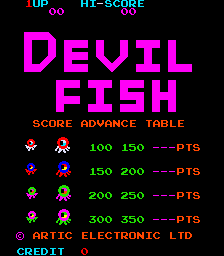
44년 전에 출시된 아케이드 비디오 게임: 악마 물고기 (c) 1982 Artic Electronics. 플레이어는 Devil Fish가 너무 뚱뚱해 전진할 수 없기 때문에 미로의 여러 통로에 스스로를 가두기 위해 먹이를 주어야 하는 Sea Dog를 제어합니다. 그들이 갇히면 Sea Dog가 그들을 만져야 합니다. 그 직후, 미로 중앙에 작은 집이 나타납니다. 터치하면 그림의 일부가 드러납니다. 전체 이미지가 공개되고 Sea Dog가 다음 레벨로 넘어갈 때까지 이 절차를 반복합니다. - 기술 - 메인 CPU: Zilog Z80(@ 3.072Mhz) 사운드 CPU: Zilog Z80(@ 1.78975Mhz) 사운드 칩: (2x) 일반 기기 AY8910(@ 1.78975Mhz) 플레이어: 2 제어: 4방향 조이스틱 버튼: 1 - 퀴즈 - 데빌 피쉬는 1982년 3월에 출시되었습니다. 이 게임의 해적판은 1984년에 Galaxian 하드웨어에서 Vision에 의해 출시되었습니다. - 득점 - 1종 작은 문어 죽이기: 100점. 1종 대형 문어 처치: 150점 2종 작은 문어 죽이기: 150점. 2종 대형 문어 처치: 200점. 3종 작은 문어 죽이기: 200점. 3종 대형 문어 처치: 250점 4종 작은 문어 죽이기: 250점. 4종 대형 문어 처치: 300점 - 팁과 요령 - * 한 번에 두 마리 이상의 문어를 게이트로 유인하여 점수를 높이세요. * 다음 화면은 더 빠른 적과 함께 시작되므로 어떤 화면에서든 너무 오래 지연하지 마십시오. * 추격하는 문어가 갇히게 될 것을 알고 있는 문 반대편에서 기다렸다가 갇히자마자 잡아채세요. 다른 문어가 죽은 문어 뒤에 가까이 있었다면 문 위로 다시 이동하여 문어가 갇히면 죽이세요.
Player layout in our catalog: 2P alt.
If you are exploring by feel rather than by title, jump from the tags above into the matching genre rooms, or return to the Arcade hall for the full wall.
Open Play on this page to start Devil Fish. Keyboard, USB/Bluetooth pads, and the on-screen touch gamepad all work inside the emulator bar. Save states and fullscreen live on that same bar so you can pause mid-session and resume later.
Player layout on this cabinet: 2P alt.
Genre tags on Classic Arcade Games: Maze, Arcade.
Nearby cabinets you may also open from this hall (each on its own play page):BnB Arcade, Vs. Battle City, Crush Roller (set 1), Dangerous Dungeons (set 1), Digger Man (prototype), Domino Man, The Electric Yo-Yo (set 1), Eyes (US set 1), Inferno (Williams), Kram (set 1), Mad Donna (Tuning, set 1), Money Money (set 1)
Yes. Classic Arcade Games hosts Devil Fish as a Arcade cabinet you can start on this page. The emulator loads in the browser; you do not need to install a separate app.
Arcade stick feel: Arrow keys for the joystick, X/Z (and nearby keys) for buttons, Enter=Start. USB / Bluetooth pads map cleanly; six-button fighters use the face-button cluster.
Our catalog tags Devil Fish under Maze, Arcade. Open those genre rooms from the tags on this page to find more playable cabinets in the same feel.
아래 iframe 코드를 복사해 사이트에 이 게임을 임베드하세요.
<iframe src="https://ko.classicarcade.games/games/arcade/devilfsh?embed=1" width="800" height="600" allowfullscreen allow="gamepad; autoplay; fullscreen"></iframe>